
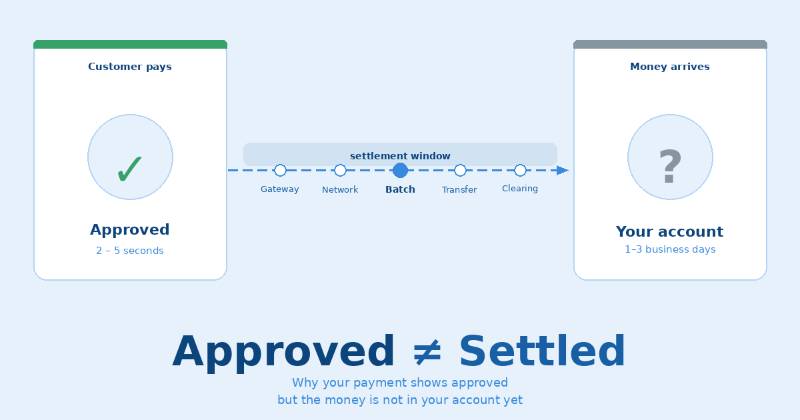
Approval and settlement are two completely different things
This is the most important thing in this entire article. Approval and settlement are not the same event. They are two separate steps in the payment process, and they happen hours or even days apart.
When a payment is approved, it means the customer's bank has confirmed that the customer has enough funds or credit and that the transaction looks legitimate. It is essentially the bank saying "yes, we will honour this payment." But the actual transfer of money has not happened yet. The funds are still sitting in the customer's bank — reserved, but not moved.
Settlement is when the money physically moves. It travels from the customer's bank, through the card network, through your payment processor, and finally lands in your merchant account. That journey takes time — and that is where the confusion comes from.
Authorisation
The customer's bank confirms the funds exist and reserves them. Happens in 2 to 5 seconds. The POS beeps. The receipt prints. But money has not moved.
Settlement
The money physically transfers from the customer's bank to your account. Happens in batches — usually end of day — and takes 1 to 3 business days to complete.
The best analogy: Authorisation is like someone signing a cheque and handing it to you. Settlement is like the cheque actually clearing your account. You have the signed cheque — but the money is not yours yet until it clears.
What actually happens to your money after a card payment
Customer taps card or phone
An encrypted payment request is sent instantly from the POS terminal to your payment gateway — the software layer that sits between your terminal and the banking system.
Gateway routes to processor and card network
The gateway forwards the request to your payment processor — such as Razorpay or Stripe — who sends it to the relevant card network — Visa or Mastercard — who then contacts the customer's bank.
Customer's bank approves and reserves funds
The issuing bank checks the customer's balance, fraud signals, and card validity. It sends back an authorisation code — or a decline. If approved, it places a hold on those funds. The money is now reserved but not transferred.
Processor batches all approved transactions
Your payment processor collects every approved transaction from the day into a single batch and submits it for settlement. This is why payments made at 9am and 4pm often settle at the same time — they are processed together.
Card network facilitates the actual money transfer
The network moves funds from all the customer issuing banks to your acquiring bank — the bank linked to your merchant account. This interbank transfer takes time because it goes through official banking settlement channels.
Money lands in your account — minus fees
Your acquiring bank receives the settled funds and credits your merchant account, subtracting processing fees. Depending on your provider and account type, this final step takes one to three business days from the original transaction.
Settlement time varies depending on how your customer paid
The weekend trap: Payments made on Friday evening may not settle until Tuesday. Banks only process settlements on business days — UPI is the one exception that operates 24 hours a day, 7 days a week including public holidays.
Why does my provider sometimes hold money even longer?
Beyond the standard settlement window, some payment providers add an additional hold on funds — particularly for new merchant accounts. This feels frustrating but there are legitimate reasons behind it.
Payment providers are taking a financial risk every time they process a card transaction on your behalf. If a customer disputes a payment — a chargeback — the provider may need to return funds to that customer. If your account does not have enough balance to cover it, the provider is left out of pocket. The holding period is their protection against this risk.
New merchant accounts, high-risk business categories, unusually large transactions, or a sudden spike in volume can all trigger longer holds. The good news is that holds typically shorten as you build a consistent processing history with no chargebacks or disputes.
How to shorten holds: Process consistently for 3 to 6 months with no disputes. Keep your average transaction value predictable. Provide your provider with accurate business documentation upfront. A clean track record is the fastest route to a shorter settlement window.
5 practical ways to get your money faster
- Encourage UPI at every opportunity. Put a UPI QR code at your counter. Add a small sign. Mention it at checkout. UPI settles in 2 seconds and costs your business almost nothing in fees — it is by far the fastest and cheapest settlement method available in India today.
- Ask your processor about next-day settlement. Most payment providers offer an accelerated settlement option for an additional fee — typically 0.5 to 1 percent of transaction value. For businesses with tight cash flow, paying slightly more per transaction to receive funds next day is often worth it.
- Close your batch before the daily cutoff time. Many processors settle transactions submitted before a specific cutoff — often 6pm or 8pm — on the same business day. Transactions submitted after that time roll over to the next batch. Know your cutoff and ensure your terminal closes its batch before it.
- Track authorised versus settled funds separately. Get into the habit of checking both numbers daily. Your total authorised amount tells you what is coming. Your settled amount tells you what is actually available. Spending against authorised amounts before they settle is how businesses accidentally overdraw their accounts.
- Build your processing history to reduce holds. If your provider has a standard hold period, the best way to shorten it is time and consistency. Process regularly, keep chargebacks to zero, and your account will typically graduate to shorter settlement windows within 3 to 6 months.
Approved means yes. Settled means yours.
The next time you see a payment approved and wonder where the money is — you now know exactly where it is. It is in transit through the settlement process, moving through the card network from your customer's bank to yours. It is coming. It just takes time.
The single most powerful thing you can do to reduce this delay is to encourage UPI payments from your customers. Instant settlement, near-zero fees, and no waiting. For everything else — understand your settlement window, know your batch cutoff, and always distinguish between what is approved and what has actually arrived.
One thing to do today: Log into your payment dashboard and find the "pending settlement" figure. That number is money your customers have already paid that has not reached you yet. Now you know exactly where it is — and how long before it arrives.
BANNER IMAGE ALT TEXT & DESCRIPTION
Alt text: "Blog banner showing a payment approval tick on the left and a bank account with a question mark on the right, connected by a dotted line labelled settlement in progress with a 1 to 3 business days indicator below, and the headline Approved does not equal Settled"
Image description: A clean light blue banner with two white cards side by side — the left card shows a green tick and the word Payment Approved, the right shows a grey question mark and the words Your Bank Account. A dashed blue line connects them with three dots showing the journey, labelled settlement in progress. Below the line a pill badge reads 1 to 3 business days. The headline at the bottom reads Approved ≠ Settled in dark blue text.
Use this alt text for: CMS image upload, social media preview, Pinterest pin description, Google Discover image metadata
Want more simple payments guides like this?
Written for business owners — no jargon, just the things that actually matter.
