
Creating invoices is one of the most important parts of running a shop. Whether you run a small kirana store, wholesale business, or service-based shop, proper invoicing helps you track sales, manage accounts, and stay compliant with GST.
Many shop owners still struggle with billing—either using manual methods or not following proper formats. This guide will help you understand how to create invoices for your shop step by step, in a simple and practical way.
💡 What is an Invoice?
An invoice is a document issued by a seller to a customer that contains details of a sale.
It includes:
- Products or services sold
- Quantity and price
- Taxes applied (if any)
- Total amount payable
👉 It acts as proof of transaction and helps in accounting.
🏪 Why Invoicing is Important for Your Shop
Proper invoicing is not just about billing—it’s about managing your business efficiently.
✅ Key Benefits:
- Keeps records of all sales
- Helps in GST compliance
- Tracks payments and dues
- Builds trust with customers
- Simplifies accounting
👉 Without proper invoices, managing business becomes difficult.
🧾 Types of Invoices You Should Know
Depending on your business, you may need different types of invoices:
- Tax Invoice – For GST-registered businesses
- Bill of Supply – For non-taxable goods/services
- Proforma Invoice – For quotations
- Retail Invoice – For direct customer sales
👉 Most shops use tax invoices or retail invoices.
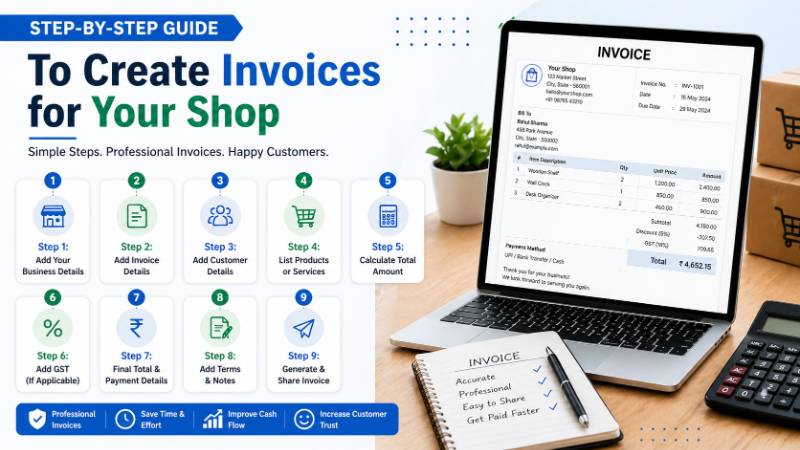
🧾 Step-by-Step Guide to Create Invoices
Let’s break it down into simple steps:
🔹 Step 1: Add Your Business Details
Start your invoice with your shop’s information:
- Business name
- Address
- Contact number
- GST number (if applicable)
👉 This builds credibility and ensures compliance.
🔹 Step 2: Add Invoice Details
Every invoice must have unique identification.
Include:
- Invoice number
- Invoice date
- Due date (if credit sale)
👉 This helps in tracking and record-keeping.
🔹 Step 3: Add Customer Details
Mention customer information:
- Customer name
- Phone number
- Address (optional for small sales)
👉 Important for credit transactions and GST invoices.
🔹 Step 4: List Products or Services
Add all items sold in a structured format:
- Product name
- Quantity
- Price per unit
👉 Make sure everything is clearly mentioned.
🔹 Step 5: Calculate Total Amount
Now calculate:
- Subtotal (without tax)
- Discounts (if any)
- Final amount
👉 Accuracy is very important here.
🔹 Step 6: Add GST (If Applicable)
If your business is GST-registered:
- Add CGST + SGST (within state)
- Add IGST (interstate)
👉 Ensure correct GST rates (5%, 12%, 18%, etc.)
🔹 Step 7: Final Total & Payment Details
Include:
- Final payable amount
- Payment method (cash, UPI, etc.)
- Payment status (paid/unpaid)
👉 This avoids confusion later.
🔹 Step 8: Add Terms & Notes
You can include:
- Return policy
- Payment terms
- Thank you message
👉 Makes your invoice more professional.
🔹 Step 9: Generate & Share Invoice
Once everything is ready:
- Print the invoice OR
- Share digitally via WhatsApp/email
👉 Digital sharing is faster and modern.
📱 Manual vs Digital Invoice Creation
There are two main ways to create invoices:
🧾 Manual Method:
- Paper bills
- Excel sheets
📱 Digital Method:
- Mobile apps
- Billing software
👉 Digital invoicing is faster, more accurate, and easier to manage.
🚀 Why Use a Mobile Billing App?
Using a billing app makes invoicing super simple.
✅ Benefits:
- Create invoices in seconds
- Automatic GST calculation
- Save customer & product data
- Track payments easily
👉 Ideal for modern shop owners.
⚠️ Common Mistakes to Avoid
Avoid these errors while creating invoices:
- Missing invoice number
- Wrong GST calculation
- Incorrect product details
- Not saving records
- Forgetting payment status
👉 Small mistakes can cause big problems later.
🧠 Tips for Better Invoicing
To improve your billing process:
- Use digital tools
- Keep invoice format consistent
- Maintain daily records
- Backup your data regularly
👉 Good invoicing habits improve business efficiency.
📊 Example of Simple Invoice Format
A basic invoice should look like:
- Shop Name & GSTIN
- Invoice No & Date
- Customer Name
- Item List (Qty × Price)
- GST Breakdown
- Total Amount
- Payment Status
👉 Keep it clean and easy to read.
🔐 Is Digital Invoicing Safe?
Yes, digital billing apps follow security standards set by the Reserve Bank of India.
🔒 Features:
- Data encryption
- Secure login
- Cloud backup
👉 Your data remains safe.
🏆 Conclusion
Creating invoices for your shop is not complicated if you follow the right steps. Whether you use manual methods or digital tools, the goal is to maintain accuracy, clarity, and proper records.
However, in today’s digital world, using mobile billing apps is the smartest choice. It saves time, reduces errors, and helps your business grow faster.
👉 Start using proper invoicing today and take control of your business finances.
